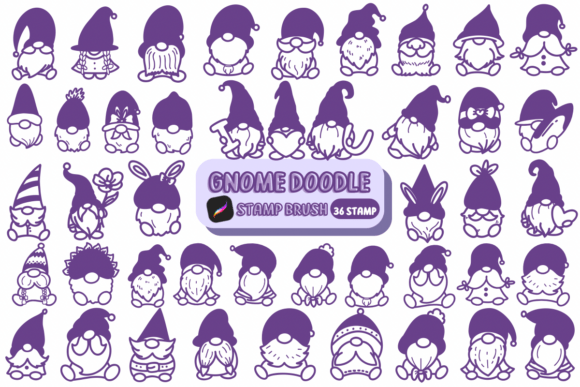
Gnome Doodle: A Sketch-Style Stamp Brush for Creative Expression
Gnome Doodle isn’t just another font—it’s a digital stamp brush designed for Procreate that brings a playful, hand-drawn charm to your creative projects. With its sketch-like texture and whimsical personality, this brush set feels like it was pulled straight from a nature journal or a rustic craft table. Whether you're designing wedding invitations, creating social media graphics, or crafting personalized greeting cards, Gnome Doodle adds a tactile, organic quality that digital tools often lack.
Unlike traditional fonts, Gnome Doodle operates as a brush pack within Procreate, giving artists and designers the flexibility to create hand-stamped illustrations with the ease of digital drawing. The result? A cohesive, handcrafted look that maintains professionalism without sacrificing warmth or approachability. This makes it especially appealing to small business owners, crafters, and content creators who want to inject authenticity into their visual storytelling.
Where Gnome Doodle Shines
One of the strongest suits of Gnome Doodle is its versatility across creative mediums. While it excels in print-based DIY and craft projects, it also holds its own in digital spaces. Here are a few areas where Gnome Doodle truly comes to life:
- Wedding and event design: Use it for save-the-dates, place cards, or custom illustrations on invitations to add a personal, artisanal touch.
- Logo and brand identity: Especially effective for eco-friendly brands, indie retailers, or lifestyle businesses that want to communicate warmth and approachability.
- Social media graphics: Perfect for quote posts, product labels, and story highlights that stand out with a handcrafted aesthetic.
- Packaging and product design: Adds character to labels, tags, and wrapping that resonate with customers on a more emotional level.
- Editorial and publishing: Ideal for children’s books, illustrated blogs, or editorial illustrations where a sense of playfulness is key.
Because Gnome Doodle mimics real-world stamp textures, it bridges the gap between analog and digital aesthetics. This makes it a strong contender for designers who want the convenience of digital tools without losing the charm of traditional media.
How Gnome Doodle Influences Design and Perception
Typography isn’t just about legibility—it’s about emotion, tone, and identity. Gnome Doodle’s sketch-style appearance immediately conveys a sense of creativity, authenticity, and friendliness. When used thoughtfully, it can:
- Enhance visual hierarchy: Its textured look naturally draws the eye, making it ideal for headlines, callouts, or focal points in editorial and web design.
- Support brand personality: Brands that aim to feel down-to-earth, artistic, or community-oriented can use Gnome Doodle to reinforce that identity visually.
- Influence audience engagement: The handcrafted appeal creates a sense of intimacy and relatability, encouraging deeper interaction with content.
- Maintain design consistency: When used as part of a broader brand toolkit, Gnome Doodle helps unify print and digital assets under a shared visual language.
However, it’s important to balance its expressive nature with more neutral design elements. Overuse can lead to clutter, especially in complex layouts or multi-layered compositions. Pairing Gnome Doodle with clean, modern sans-serif or serif fonts often yields the best results, creating contrast without visual fatigue.
Choosing and Using Gnome Doodle Effectively
Before diving into your next project with Gnome Doodle, consider a few practical factors to ensure it aligns with your creative goals:
- Project fit: Gnome Doodle works best in contexts where a relaxed, handcrafted feel is appropriate. Avoid using it in highly formal or technical environments unless you're aiming for a juxtaposition.
- Font pairing: Combine it with simpler typefaces to create visual balance. For example, pair it with a minimalist sans serif like Montserrat or Lato for digital layouts, or with a serif like Playfair Display for printed editorial work.
- Readability considerations: Because of its textured, sketch-like appearance, Gnome Doodle may not be ideal for long blocks of body text. Instead, use it for accents, titles, or decorative elements where impact matters more than extended reading.
- Licensing: Always verify the commercial use rights for Gnome Doodle, especially if you're creating work for clients or selling digital or physical products. Most premium font and brush packs include commercial licenses, but it’s always good to double-check.
When testing Gnome Doodle in your workflow, try applying it to different design elements—like icons, borders, or background textures—to explore its full creative potential beyond just lettering. The brush format in Procreate allows for easy customization, so don’t be afraid to adjust pressure settings or layer effects to match your specific style.
Final Thoughts: A Creative Asset Worth Exploring
Gnome Doodle is more than a design tool—it's a way to bring a sense of warmth and individuality to your creative output. Whether you're a designer working on client branding, a small business owner crafting custom packaging, or a blogger enhancing your visual content, Gnome Doodle offers a unique blend of flexibility and charm.
In a world where digital design often leans toward the sleek and polished, Gnome Doodle reminds us that there’s still space for the imperfect, the hand-drawn, and the personal. When used with intention and care, it becomes more than a stylistic choice—it becomes a storytelling device that connects with audiences on a deeper, more human level.